Mind ‘win32manifest’ when interop-ing

Tags: , , , , ,
No Comments »

For those who look for a quick solution:

Try switching off the win32manifest-switch in Visual Studio.

Here is the long story.

Hi! As you may already know we are working on the best .NET – ARIS interface there is so far. It’s an interface that makes heavy use of an old C-Api, using interop and p/invoke.

In Mid-December Benjamin found a very strange behavior that almost spoiled my Christmas. We had just release Version 1.1 when he called me: “Arisan crashes with Vista64.” I was shocked. “And with Vista32 as well”. I felt annihilated. We had done so much testing with various versions of XP, Vista and it worked fine with any of those OSes.

After some testing I saw that ARIS didn’t deliver any pointers at all. That’s rather bad for an interface to C that uses pointer in every call.  After one more day we had more evidence: We had switched to .NET3.5 and VS2008 some month ago and our old versions, that were compiled using the .NET2.0-compiler, still worked.

I was so terrified. The 3.5-framework should be similar to the 2.0-framework, just some (not so) little enhancements. A bug in the 3.5-compiler?

To provide a quick solution we re-wrote parts of the fancy 3.5-syntax, to make our newest enhancement compile with the 2.0-compiler again. That worked (at least we thought so) and we released version 1.1.1.

Then a very frustrating time began. We read articles over and over and quickly found this very interesting post. The problems described there where exactly what we saw.  So we followed the track of the nxcompat-flag and DEP, but it didn’t lead us anywhere.

The C-Api we interface is well documented, but it calls hundreds of other components and one of them crashed deep inside an undiscovered country.

We read pages of differences between 2.0- and 3.5-compiler, new compiler-flags (should have paid more attention here), any documentation we could find, but nothing seemed to help.

We had a feeling it could have something to do with Vista UAC, but we didn’t find any matching explanations to our problem. Being really desperate we started this thread at the MS forums. As you can read there, no one could provide a solution that worked.

I was really sad, because the last thing I wanted to do was to switch the entire development of arisan back to VS2005. I got prepared for a very sad life from now on.

But five days ago my life turned to happiness again. One more time I started of by googling words like “.NET compiler 2.0 3.5 differences” and one more time I read the new features of the 3.5-compiler. This time I obviously paid more attention to the compiler-flags and read about the /win32manifest and /nowin32manifest – switches. I didn’t have much hope left, but tried to set the /nowin32manifest switch.

It worked! Everything worked! The C-Api delivered pointers again. I tried switching the win32manifest on and off and a day later Benjamin confirmed my results. We had found it. But after a long time of suffering (for me it felt like half a year) we still were skeptical and thought we needed a deeper understanding of the problem.

The win32manifest and UAC

Finally we had something to look for and quickly found valuable information on the great I’m just sayin’ blog. The documentation of the switches helped as well, so here is a summary:

The win32manifest is not the .NET-manifest.

The win32manifest is part of the UAC (user access control). UAC was introduced with Vista as an answer to more and more security threads. One of its ideas is to keep malicious software from secretly starting to work. If you work with Vista you may have noticed a lot of dialogs that ask you for permission to run certain programs. THAT is UAC.

Now the win32manifest inside an application tells the OS what level of permission it needs to run. There are levels like “asInvoker” (default), “highestAvailable” or “requireAdministrator”. In case the OS (and the current user) can provide the requested permission, the program runs as a trusted process (according to the granted access level). Of course, 90+% (just my estimation) of the programs on you Vista-machine don’t have a win32mianifest,  because it’s a new feature and older applications just don’t have it. (And I think a majority of newer applications won’t have it either). In order to be compatible with no-win32manifest applications on one hand and providing security on the other hand, Vista can do a miracle called “virtualization”. It’s a bit like running a process in a sandbox: Vista provides anything the process may need to run: disk space, memory, a registry etc. So the process feels cosy.

But anything provided this way is separated from the main system. The process uses a copy of the registry, writes to a special parts of the HDD drives and accesses the memory in a controlled way (not sure about the memory thing…). For me this is a great achievement of Vista, almost magic. I can’t tell in detail how it works (mainly because I don’t have a clue), but it works good and doesn’t cost notable performance.

So on your Vista machine you have processes that run virtualized and others that run non-virtualized. “Non-virtualized” is also called “UCA-compatible” or just “compatible”, so I’ll adopt this wording here.

You could say that Vista trusts compatible processes a little bit more than virtualized processes. That doesn’t mean virtualized processes are evil, but.. well… maybe… under certain circumstances… not 100% trustworthy. (Here is another nice article)

Note three facts here:

  1. The state (virtualized/compatible) always counts for a process and is set when the process starts. When you start an .exe-file, Vista decides how to run it.
  2. Because of 1) there is no sense in attaching a win32manifest to components that do not start a process, like .dlls. Thus .dlls don’t have a win32manifest.
  3. The state (virtualized/compatible) of a process doesn’t change during its lifetime.

So if a .dll is used by a virtualized process, its code also runs virtualized. And if the same .dll is used by a compatible process, its code runs compatible.

Interaction

With some of that in my mind, I could explain the problems we had with our interface software arisan: arisan is a .dll you reference in your .NET-application and use it. As mentioned above arisan calls a native (so non-.NET) .dll using p/invoke-interop-techniques. Now this native .dll starts a bunch of new processes: a database-server, a database-driver, some middle-layers, etc. I am pretty sure non of this newly started processes is based on applications with a win32manifest – so they all run virtualized.

But the .NET-applications we use to test the arisan.dll started running compatible as we switched to VS2008 and the 3.5-compiler. So our test application (compatible) called arisan.dll (compatible), arisan.dll (compatible) called C-Api.dll (compatible). C-Api.dll started new processes (virtualized !!) and called functions there. And in the end a compatible (fully trusted) process asked a virtualized (less trusted) process to fill some pointers… and that’s the point where Vista interferes and says: “Dudes, are you drunk? No way!”

It was a bit of bad luck that the clash of a virtualized and a compatible process happened so deep inside a software we couldn’t debug and only threw some strange, meaningless error-messages, but on the other hand Vista could have told us more. Maybe there is some place in Vista where the clash is logged. If someone knows – please let me know, too. Let me get this straight: Vista is absolutely right here, but I’d wish more information when it happens. I don’t exactly know how, but you could do harmful things if you could easily exchange all sorts of pointers between virtualized and compatible processes…

Solution

So finally the solution was easy. Both processes have either to run virtualized or non-virtualized. Since we can’t make a third-party software run compatible, we have to make our .NET-application run virtualized: We just need to prevent .NET from inserting a win32manifest to executables.

Using the compiler from the command-line the compiler-flag /nowin32manifest does it.

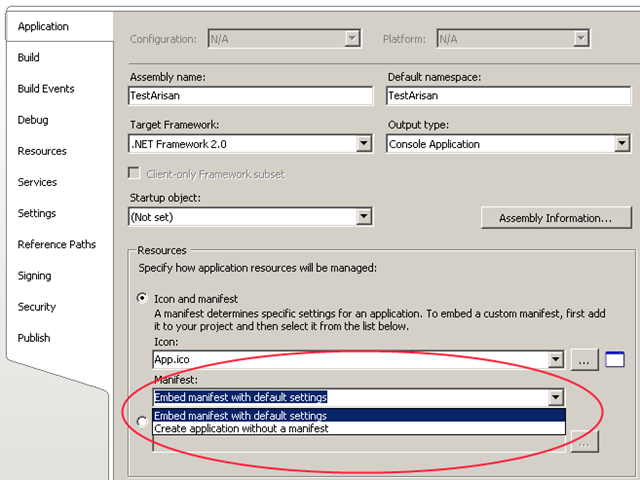
In VS2008 same switch can be found on the “Application”-tab of the project properties.
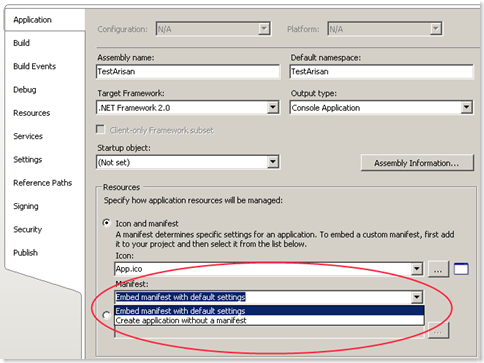
image

The manifest-area is enabled for ‘console applications’ and ‘Windows applications’. It is disabled for class libraries.

Another way to handle this problem is to switch off UAC completely. But we strictly advice you against this solution. UAC is one of Vista’s main features and it is designed to provide shelter for your precious data in times of evil viruses and brutal intrusion attempts :-)

Epilog- bad fix

After we understood the problem, we saw that the ‘fix’ we provided as V1.1.1 couldn’t do much. Ok – it made the demos run, because the executable compiled with the 2.0- come without a win32manifest and thus run virtualized. But users trying it with VS2008 still had the same issues.

Actually we cannot provide a technical solution with the arisan.dll, because if the running mode depends on the executables that use arisan. So we’ll write detailed information and everyone lived happily ever after.
Flow

Tags: , , ,
2 Comments »

It was very silent here in the past month. That was mainly because I was working on my diploma thesis until the end of September. After that I did my final exam and started working in Bonn. Now it is December and almost 2009. I’m sitting in a plane to Australia for holiday and have much time to write articles. I will try to keep this blog alive and will write articles more frequently.

Today I will introduce Flow. With Flow you can model the behavior of nodes in a wireless sensor network (WSN) in a data driven and event driven manor. I developed Flow as part of my diploma thesis.

Flow is build as a Visual Studio Addon (a VS Package) on top of the DSL-Tools containing three different domain specific languages to describe different parts of the software running on a sensor node. These different DSLs are working together and using most of the techniques I described earlier in this blog. E.g. my library JaDAL was initially build to support this diploma thesis.

You will find screenshots, more explanations and Flow itself on http://flow.irgendwie.net. While the webpage and the software are available in English the thesis itself is a pdf-document and can only be downloaded in a German version.

The software is fully working and if no wireless sensor network is available you can use a node simulator to evaluate Flow. The code is released under the new BSD license and also available for download.

Screenshots:

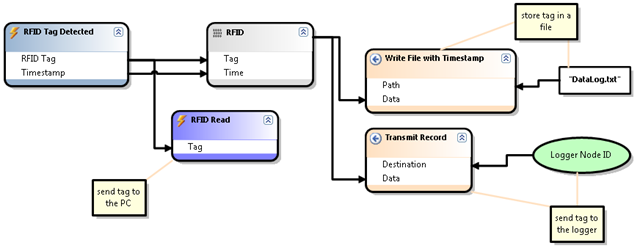
Dataflows modeled with Flow looks like that:

dataflow

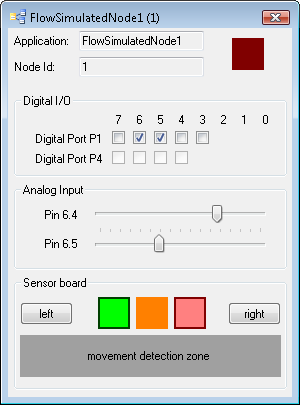
The simulated sensor nodes are represented as Windows forms programmed by such dataflows:

simulatednode

For more information just visit http://flow.irgendwie.net.

DirectiveProcessor for VSX

Tags: , , , ,
No Comments »

I created two DirectiveProcessor for Visual Studio to use in the T4 system. I added the classes to JaDAL hoping someone can use them in her project or use the code as an example when creating new DirectiveProcessors.

Let’s start with a short introduction to DirectiveProcessors. DirectiveProcessors are used in .tt-files to provide data to the template. The DirectiveProcessor can take parameters from the declaration in the .tt-file and adds some code to the compiled template. This code (often properties) can be used from within the template. For example the DSL Tools are generating one DirectiveProcessor for each DSL model. In a template form the DSL Tools you will see a line like the following:

<#@ Language1 processor=Language1DirectiveProcessor
requires=fileName=’Sample.mydsl1′#>

This line uses the Language1DirectiveProcessor and provides it with one parameter (fileName). The DirectiveProcessor adds code to the template to open the given file and creates (in this case) a ExampleModel-property to use in the template code.

I created two DirectiveProcessors to use the data of simple Xml-files and Visual Studio Project files in the templates. The code of the two DirectiveProcessors is very straight forward and maybe one could advance it (e.g. make it compatible with templates written in Visual Basic).

Using the XmlFileDirectiveProcessor

Add a line like the following to your .tt-file:

<#@ XmlFile processor=XmlFileDirectiveProcessorFileName=example.xml#>

Inside this template you can access the (full qualified) filename via the this.XmlFileName-Property and the Content of this file (as a XDocument) via the this.XmlFile-Property.

Using the VsProjectFileDirectiveProcessor

Add this line to your template:

<#@ ProjectFile processor=VsProjectFileDirectiveProcessorFileName=x.csproj#>

A property named this.ProjectFile will be added to the template. This property provides you with an instance of the VsProjectFile-class containing the project file contents. This class contains only very little functionality (feel free to add some more and submit it back to me!). Just take a look at the source code of this class. The method GetAllFiles() returns a string array of all files found in the project (supporting C++ and C# project files – .vcproj and .csproj).

Setup

An entry in the registry is needed to allow the T4 system to find custom DirectiveProcessors. Just add the following entries to your registry and don’t forget to point to the right location of the JaDAL.dll.

[HKEY_CURRENT_USER\Software\Microsoft\VisualStudio\9.0Exp\
Configuration\TextTemplating\DirectiveProcessors\VsProjectFileDirectiveProcessor]
“Class”=”BenjaminSchroeter.Dsl.DirectiveProcessors.VsProjectFileDirectiveProcessor”
“CodeBase”=”D:\\JaDAL\\bin\\Debug\\JaDAL.dll”

[HKEY_CURRENT_USER\Software\Microsoft\VisualStudio\9.0Exp\
Configuration\TextTemplating\DirectiveProcessors\XmlFileDirectiveProcessor]
“Class”=”BenjaminSchroeter.Dsl.DirectiveProcessors.XmlFileDirectiveProcessor”
“CodeBase”=”D:\\JaDAL\\bin\\Debug\\JaDAL.dll”

These registry keys are for the Experimental Hive of Visual Studio. To register the DirectiveProcessors for the normal Visual Studio instance the registry key starts with HKEY_LOCAL_MACHINE\Software\Microsoft\VisualStudio\9.0
\TextTemplating\DirectiveProcessors\

Getting rid of the DSL model explorer

Tags: , , ,
3 Comments »

Every DSL you create with DSL Tools has a model explorer. This model explorer is a tool window in Visual Studio displaying the elements of your model in a hierarchical way. This is often a nice feature but sometimes a hierarchical view of your data is not appropriate. So I came to the question: How to remove the explorer from the generated code?

I could not find any option in the DSL design to remove the model explorer, but if you look at some of the .tt files you will find somewhere a query for this.Dsl.Explorer != null. For example in the package.tt file that generates the package.cs which is responsible for registering the tool window for the model explorer:

<#
    if(this.Dsl.Explorer != null)
    {
#>
    [VSShell::ProvideToolWindow(         typeof(<#= dslName #>ExplorerToolWindow),          MultiInstances = false,          Style = VSShell::VsDockStyle.Tabbed,          Orientation = VSShell::ToolWindowOrientation.Right,          Window = "{3AE79031-E1BC-11D0-8F78-00A0C9110057}")]
    [VSShell::ProvideToolWindowVisibility(         typeof(<#= dslName #>ExplorerToolWindow),          Constants.<#= dslName #>EditorFactoryId)]
<#
    }
#>

Even if I did not find any option to set the Dsl.Explorer property of the model to null (you did not see the Explorer property anywhere in the DSL diagram) it seems that the developers of the DSL Tools had this use case in mind.

To remove the Dsl.Explorer from your DSL model open the .dsl file with a text editor and go to the end. There you will find some XML tags like the following:

<Explorer ExplorerGuid="6c276297-6acd-4e9a-8740-b61ba834004b"  Title="HardwareDescription Explorer">
    <ExplorerBehaviorMoniker      Name="HardwareDescription/HardwareDescriptionExplorer" />
</Explorer>

Just delete these three lines and generate your code once again. Maybe you should reset your Experimental Hive, too.

I tested a DSL with a removed Model Explorer without any problems. It seems the developers of the DSL Tools did a very good job on the code generation templates . The generated ModelExplorer.cs file contains only a single line:

// This source file is empty because    this DSL does not define a model explorer.

That should be a good proof that a DSL can run without the model explorer even if it might be not supported by the DSL Tools. :-)

Workaround for Known Issue with TypeDescriptors in DSL Tools for Visual Studio

Tags: , , ,
No Comments »

There is a known issue in the current version of the DSL Tools while dealing with custom TypeConverters or custom TypeDescriptors:

1.10 TypeConverters and TypeDescriptors are not picked up during the build process or during toolbox initialization.
When adding a custom TypeConverter or TypeDescriptor and then building the DSL, the TypeConvertor or TypeDescriptor is not picked up. The workaround is to rebuild the solution with a clean build.

[see Known Issues for Microsoft Visual Studio 2008 SDK 1.0]

Some time ago I posted a workaround for this problem with the TypeConverter, but today a realized that this workaround does not work with the same issue for TypeDescriptors.

Imagine some class with the following attribute:

[TypeDescriptionProvider(typeof(MyClassTypeDescriptionProvider))]
public partial class MyClass : ModelElement
{}

The corresponding TypeDescriptor (provided by the MyClassTypeDescriptionProvider class) is loaded only the first time you build or rebuild your solution. Every time you start Visual Studio after that, this attribute seems to be ignored.

Fortunately there is another way to glue TypeDescriptors to your classes using a static method of the TypeDescriptor class at runtime:

TypeDescriptor.AddProvider(
   new MyClassTypeDescriptionProvider(), typeof(MyClass));

I think a good place for this code is the static constructor of the MyClass type:

partial class MyClass
{
    static MyClass()
    {
        TypeDescriptor.AddProvider(
            new MyClassTypeDescriptionProvider(),
            typeof(MyClass));
    }
}

Another interesting point is: Not only custom TypeDescriptors you write yourself are affected by this problem, also the TypeDescriptors that are generated by the DSL-Tools from your DslDefintion have to struggle with it:

In the DSL Explorer you can define custom TypeDescriptors for each Domain Class and each Shape. Even these TypeDescriptors will not be loaded after the first run. In other words: the definition of TypeDescriptors in the DSL Explorer is pretty useless as long as you do not add the three lines of code to each class. Of course this is something one can automate! :-) I stole some code from PropertiesGrid.tt and added a few lines to create the RegisterTypeDescriptor.tt. Just add this file to your Dsl Project in the GeneratedCode folder and all TypeDescriptors defined in the DSL Explorer will be loaded every time you start your project.

Even CodeVeil has bugs

Tags: , ,
No Comments »

I love CodeVeil. From my point of view CodeVeil is simply the best tool to protect .NET assemblies from being reflectored, decompiled or whatever. It is very powerful, offers a wide range of protection aspects and still comes with a handy gui. So far I haven’t seen a method to crack veiled assemblies and that’s why I really rely on it for my commercial products.

You don’t find bugs in CodeVeil when you try to find them, but half a year ago we found this one by chance. CodeVeil veils well, but the resulting code throws a mighty exception.

You don’t need spectacular code to lure the bug out of it’s hole – here is the prelude:

private static void Main(string[] args)
{
    // Get list and fill it with values
    List<Capsule<int>> l = new List<Capsule<int>>();
    l.Add(new Capsule<int>(23));
    l.Add(new Capsule<int>(42));

    // Have it sorted
    List<Capsule<int>> l2 = GetSortedReturnList(l);

    // Show result
    foreach (Capsule<int> ci in l2)
        Console.WriteLine(ci.Item);

    Console.ReadLine();
}

A simple list of two ints that are encapsulated in a generic type. The generic type just makes sure that two items can be compared:

internal class Capsule<T> : IComparable<Capsule<T>>
{
    public T Item;

    public Capsule(T i)
    {
        Item = i;
    }

    public int CompareTo(Capsule<T> other)
    {
        return Item.ToString().CompareTo(other.Item.ToString());
    }
}

And this code causes the exception when being executed by the veiled assembly:

private static List<Capsule<T>> 
    GetSortedReturnList<T>(List<Capsule<T>> list)
{
    int sortOrder = 1;
    list.Sort(
        delegate(Capsule<T> a, Capsule<T> b) 
          { return sortOrder * a.CompareTo(b); });

    return (list);
}

The sore point is the sortOrder variable being multiplied with the result of a.CompareTo(b) used in an anonymous method. Okay, you wouldn’t expect this code from a beginner, but it’s not rocket-science either. So we were very astonished and it took us quite some time to track this down and to believe our eyes. Maybe the problem with CodeVeil is related to the internal representation of anonymous method. When you use a constant instead of a variable

const int sortOrder = 1;

the problem disappears. I guess the compiler eliminates the constant and CodeVeil will not see it. But it remains, when you use a Linq-notation here:

list.Sort((a, b) => a.CompareTo(b)*sortOrder);

As said before we found this bug half a year ago. We contacted Xheo and received a very quick and friendly reply, but no solution. Seasons went by and several new versions of CodeVeil were released; but this bug is still present. At least in the stand-alone version.

But there is hope: The new beta preview of the DeployLX suite contains an obviously new version of CodeVeil and the bug is finally gone. And – by the way – this new version seems to offer a nice package of new feature and improved power! So, please, Mr. Xheo, release a new stand-alone-version of CodeVeil based on the new beta preview!

Where can I find the model filename in a text template (tt)?

Tags: , , , ,
No Comments »

As you know I was working with the DSL Tools in the past months. For some weeks I am writing the code generation for my project and I am struggling with new problems.

For some reason I want to know the filename of the model used in the tt-file. The default implementation provides you only with a reference to the model but with no chance to get its filename.

In your tt-file you will find something similar to

<#@ Language15 processor="Language15DirectiveProcessor"
     requires="fileName='Sample.mydsl1'" #>

This will use the Language15DirectiveProcessor to load the given file and provide your template with a global ExampleModel variable (of cause the name depends on your DSL and you can change it with the provides attribute in the tt-file).

To change the Language15DirectiveProcessor you can create a partial class in your DSL and add some code to it:

partial class Language15DirectiveProcessor
{
    protected override void GenerateTransformCode
     (string directiveName,
      StringBuilder codeBuffer,
      System.CodeDom.Compiler.CodeDomProvider languageProvider,
      IDictionary<string, string> requiresArguments,
      IDictionary<string, string> providesArguments)
      {
        base.GenerateTransformCode(directiveName,
                    codeBuffer, languageProvider,
                    requiresArguments, providesArguments);           

        codeBuffer.AppendFormat(
           "public string {1} = @\"{0}\";",
             requiresArguments["FileName"],
             providesArguments["FileName"]);
       codeBuffer.AppendLine();
    }

    protected override void InitializeProvidesDictionary
    (string directiveName,
      IDictionary<string, string> providesDictionary)
    {
        base.InitializeProvidesDictionary(directiveName,
                            providesDictionary);

        providesDictionary.Add("FileName","FileName");
    }
}

This adds a new global variable FileName to the tt and initializes it with the model file name.

Attention: You see the variable in this example is generated by writing a line of C# code to the codeBuffer. This may be a bad idea if you want to use this DirectiveProcessor for templates where the template language is set to VB. The better way is to create the code using the Emit and CodeDom API, but I was to lazy to do it that way.

If anybody ports this code to work with VB templates by using the CodeDom or plain VB code, please post a comment here.

Further reading: The process of creating your own DirectiveProcessor and everything you need to understand the code above can be found in the msdn: Creating Custom Text Template Directive Processors.

Visual feedback for black connectors on mouse over

Tags: , , ,
No Comments »

One of my DSLs uses many black connectors laying all over the screen. Every time I try to follow one connector I select it to change the border and to see a difference between all connectors. A colleague saw this design and asks me to implement a mouse over feedback for these connectors since all shapes have already such a visual feedback. The color of shapes changes a little bit if the mouse is over the shape. I had no idea how this should work for connectors…

First I take a look on the properties of the connector in the DSL designer and while searching I observed something: The DSL designer has this behavior on all connectors! I don’t have to write code for the MouseOver-event, but I have to figure out how to activate this behavior on my DSL editor.

For my surprise, the connectors on a newly created example language have a mouse over feedback, too. After playing around with some properties I was faced to a interesting fact: The mouse over feedback works pretty good for all connectors but black ones. I had no idea what’s going on.

Long story short: With Reflector I found one interesting method in the ShapeElement class: ModifyLuminosity(). The documentation is very clear:

"Calculates the luminosity of the highlight for the shape."

"The formula that creates luminosity. By default, the formula is: if luminosity is >= 160, then luminosity = luminosity * 0.9; otherwise, luminosity = luminosity + 40."

The luminosity of a black connector is 0 so the new luminosity will be 40. But for the color black you hardly see a difference between 0 and 40. But with this knowledge you can override the method in the connector class like this:

protected override int ModifyLuminosity
              (int currentLuminosity, DiagramClientView view)
{
  if(!view.HighlightedShapes.Contains(new DiagramItem(this)))
     return currentLuminosity;

 return 130;
}

The value 130 on a black connector works pretty good for me. Just try a few values und find a value you like.

HighlightedConnector

msi-installer and RemovePreviousVersions-option fixed in Visual Studio 2008

Tags: , ,
1 Comment »

Visual Studio 2005 had a known issue with the setup project and the RemovePreviousVersions option if the version number of your software is less than 1.0. This was a problem for me every time I released a new version of PhotoTagStudio. Like most small open source projects I won’t call it 1.0 (the current version is 0.7).

I described the problem and a workaround using the tool orca.exe. Every time I build a new setup I had to patch the setup. Last week I switched my PhotoTagStudio project to Visual Studio 2008 and created a new release. While patching the created msi I discovered that there is no need to do it that way any more. The problem seems to be fixed in the Visual Studio 2008 release!

Great work Microsoft!

Custom restrictions for Domain Properties

Tags: , , , ,
1 Comment »

In To restrict dynamically the usage of Domain Properties in DSL Models I described a way to restrict the usage of certain domain properties by the user. You can define different modes for your editor and thus allow or prevent the usage of domain properties via attributes on your domain classes. The technique is described in the linked article and the code is released as part of JaDAL – Just another DSL-Tools Addon Library.

This is a pretty static way to control the domain properties. You have to define a few modes and decide at design time the visible and active properties for each mode. Sometimes you need a more dynamic way: So I introduced another attribute CustomRestrictedPropertyAttribute and an interface ISupportsUserRestrictions. If this attribute is present, the library will call the GetRestriction() method of this interface and your user code can decide whenever the domain property will be visible, hidden or read only.

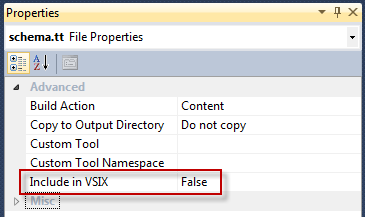
I built a small example: a domain class contains a few properties: CustomPropery, CustomPropertyVisible and CustomPropertyReadOnly. The two flags cause the first property to be visible, hidden or read only in the properties window.

[CustomRestrictedProperty("CustomProperty")]
partial class ExampleElement : ISupportsUserRestrictions
{
    public Restriction GetRestriction(string property)
    {
        if (property == "CustomProperty")
        {
            if (!this.CustomPropertyVisible)
                return Restriction.Hidden;

            if (this.CustumPropertyReadOnly)
                return Restriction.ReadOnly;

            return Restriction.Full;
        }

        return Restriction.Full;
    }
}

properties

This example can be downloaded as part of the JaDAL source code. Currently you have to catch the code directly from the Source Code tab at CodePlex since it isn’t part of the latest Release yet.

WP Theme & Icons by N.Design Studio
Entries RSS Comments RSS Log in